
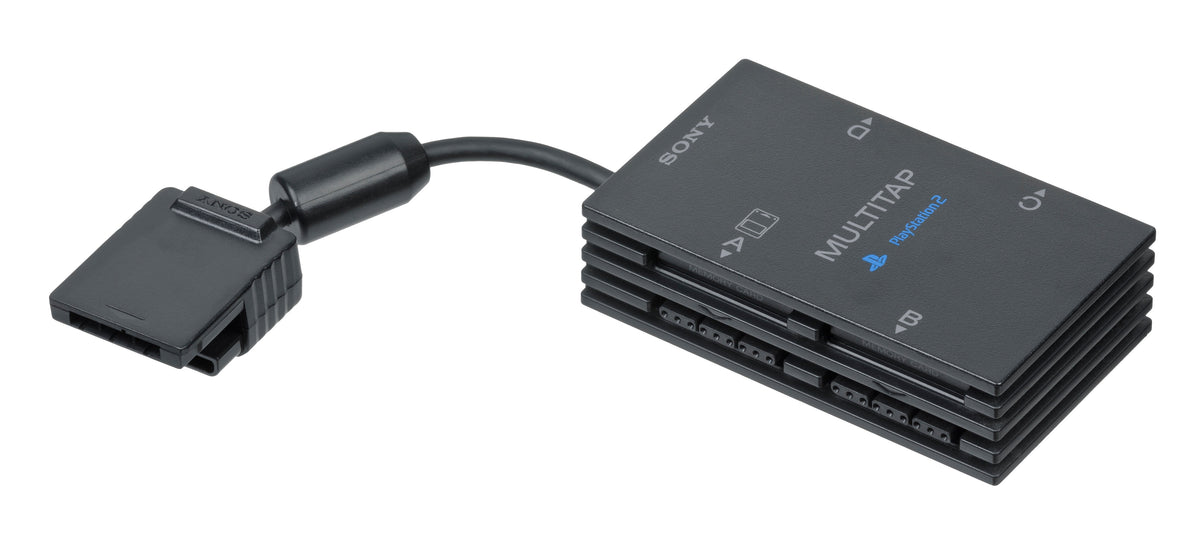
A console's front panel looks like a head count. Two sockets suggest two players; four suggest four. Put a multitap beside it and the arithmetic gets less comfortable. Are we counting places to plug in, controllers the hardware can connect, or people the game actually lets into the match?
Those are different numbers. Older multiplayer setups make the distinction unusually visible because part of the answer sits outside the console in a separate plastic box. Understanding that box is more useful than counting spare pads and hoping the game will work out the seating plan.
Featured photo: the original-model PlayStation 2 Multitap, SCPH-10090, not the later slim-compatible adapter. Photograph by Evan-Amos, public domain, via Wikimedia Commons.
The PlayStation turned one connection into several
Sony's PlayStation hardware history describes two controller ports on the console and an official Multitap that connected four controllers through one port. With two Multitaps, compatible games could support up to eight players. The important qualification is the software: an adapter expands the connection arrangement, not every game's rules.
This changes what the accessory represents. It is not merely a spare socket for a broken port, and it is not a universal multiplayer upgrade. It is one component of a particular setup. A game designed for fewer participants does not acquire extra characters, cameras or turn assignments just because another controller is now physically present.

It also gives hardware collecting a different focus from the history of the controls in your hands. Here the question is not what each player's buttons can express. It is how several players reach the same machine, and whether the chosen game knows what to do with them.
Saturn makes the hardware-versus-software gap explicit
Sega's Japanese Saturn peripheral archive records the HSS-0103 Multi Terminal 6 with six controller connections. It describes seven connected controllers using one unit and twelve using two. Then it adds the detail that matters to an actual gathering: released software reached a maximum of ten players with Saturn Bomberman.
Twelve possible connections and ten supported players are not contradictory specifications. They answer different questions. One describes the arrangement of hardware; the other describes what released software used. The unused capacity is not a missing feature that plugging in more pads can unlock.

For a collector, that distinction keeps an impressive accessory from becoming an exaggerated promise. Describe what the adapter connects, then separately identify the game and supported mode. A photograph of a crowd of controllers cannot establish a game's player limit.
Nintendo 64 moved the extra connections into the console
Nintendo's Nintendo 64 history highlights four built-in controller ports and multiplayer games including Mario Kart 64 and Mario Party. Compared with an accessory-based arrangement, the visible difference is straightforward: those four connections are already on the machine.
That removes an adapter from the equipment list for supported four-controller play. It does not make four players a property of every cartridge. The front panel tells you where controllers can connect; the individual game's instructions still tell you which mode and player count are available.

This is a useful way to compare console designs without turning the comparison into a winner's podium. Built-in connections simplify one part of assembly. An expansion accessory offers a different arrangement. Neither observation, by itself, tells you whether the game you want supports the session you are planning.
Even an unchanged function can need a different adapter
PlayStation 2 adds another wrinkle. In its September 21, 2004 redesign announcement, Sony listed two controller ports for the Japanese SCPH-70000 console and a new SCPH-70120 Multitap. Sony explained that the previous model's Multitap could not be used because of the design difference, although the replacement offered the same function.
That is a narrower lesson than saying every PS2 accessory changed or that every slim revision shares one compatibility rule. A familiar purpose does not establish a physical match. The old adapter pictured at the top of this article is therefore an illustration of the accessory category, not a recommendation for that redesigned console.
Our console revision feature examines the wider model-number issue. For multiplayer, the specific consequence is that the connection chain can fail before the game ever gets a chance to count its players.
Build the session backward from the game
Start with the exact game and the mode you want to play, rather than the largest number printed on an accessory. Establish its supported participants, then identify the required controller arrangement and the adapter that fits the console being used. Keep those answers together when describing or documenting a multiplayer bundle.
That method also avoids confusing a controller-port question with a networking question. Local multiplayer takes several forms; a multitap discussion concerns several controllers reaching one console, not an automatic route to linking several machines.
The satisfying collection is not necessarily the one with the most sockets. It is the one whose game, mode, console and accessories agree with each other. Count the people the game supports first. Then make sure every one of them has a documented way in.


