Controllers are easy to treat as accessories, but they are closer to a game’s physical vocabulary. Change the directions, the number of buttons, or the kind of feedback in a player’s hands and designers gain an entirely different set of ideas to work with. The long path from one stick and one button to dual analog controls, vibration, adaptive triggers, and accessible input is really a history of games learning new verbs.
The joystick era made every input count
Atari’s Video Computer System arrived in 1977 and was later renamed the Atari 2600. Its familiar CX40 joystick paired a single directional stick with one red fire button. That limitation forced designers to make every action legible. Movement belonged on the stick, while firing, jumping, or another essential action had to share the lone button.
The design also separated the controller from the console. Players could hold it where comfortable, replace it when worn, and use the same basic device across a large library. Modern controllers have far more inputs, but the idea of a consistent control language across a platform was already taking shape.

The D-pad turned movement into a shared language
The rectangular NES controller replaced a tall joystick with a thumb-operated Control Pad, then grouped A, B, Start, and Select beside it. Nintendo’s own Super Mario Bros. manual maps walking and ducking to the Control Pad, jumping to A, and dashing or throwing fireballs to B. The layout is simple enough to learn quickly, yet expressive enough to support momentum, precision, and combinations.
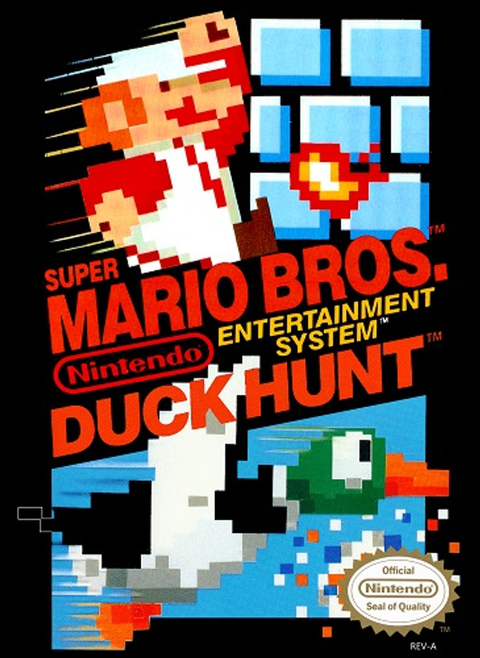
That is why an original Super Mario Bros. / Duck Hunt cartridge still feels instructive. The controller and the game teach each other. The player learns a small set of inputs, then discovers how timing and combinations expand them.

More buttons gave games more verbs
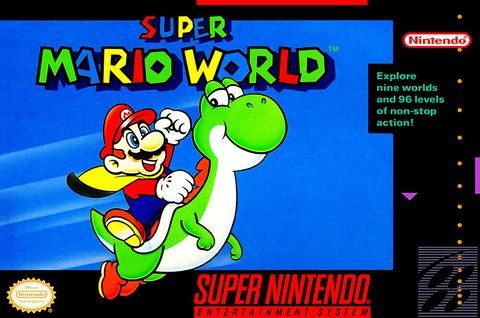
The Super NES kept the D-pad foundation and expanded the face to four action buttons, plus shoulder buttons. That extra room let games separate actions that once had to be combined or omitted. In Super Mario World, Nintendo’s official manual shows running and carrying on Y, jumping and swimming on B, spinning on A, and camera panning on L and R.
The important change was not button count by itself. It was that the controller could support more simultaneous ideas without abandoning a layout players already understood. This pattern still drives hardware design: preserve the familiar core, then add a new capability carefully enough that developers can depend on it.
Analog control opened the door to 3D space
The Nintendo 64 controller made analog movement central. Nintendo describes its Control Stick as offering 360-degree control, while the three-prong shape supported different grips for different styles of play. In a 3D world, a player no longer had to choose only between full-speed digital directions. The stick could communicate angle and intensity.
That shift changed camera work, character speed, aiming, and exploration. It also produced an era of experimentation. Some games used the center and right grips, others leaned on the D-pad, and developers were still deciding how a 3D game should feel. The controller looked unusual because the design problem itself was new.
Dual sticks and vibration became the modern baseline
PlayStation’s controller history records the Dual Analog controller in April 1997 and the first DualShock in November 1997. The paired sticks supported independent movement and viewpoint control, while vibration made feedback physical. Sony also notes that Ape Escape was the first PlayStation game to require the DualShock, a clear sign that a controller feature could become part of a game’s core design rather than an optional flourish.
The modern two-stick layout made genres such as first-person shooters more consistent on consoles. Halo: Combat Evolved is a useful example of the standardized language that followed: one stick for movement, one for looking, with triggers and shoulder inputs close at hand.

Today’s controllers refine feel, access, and connection
Current controller design is less about adding another row of buttons and more about improving what familiar inputs can communicate. Sony’s DualSense adds adaptive triggers and detailed haptic feedback. Microsoft’s Xbox Series X controller work focused on broader ergonomics, faster input response, easier sharing, and movement between Xbox, PC, and mobile devices.
Accessibility has become a hardware design priority too. The Xbox Adaptive Controller provides ports for external switches, buttons, mounts, and joysticks, with remapping and profiles available through the Xbox Accessories app. That approach matters because a standard gamepad is not equally usable for every player. A mature control ecosystem needs different paths to the same in-game action.

What collectors should look for
Controllers are part of the historical experience, not merely a way to start a game. A worn analog mechanism, weak shoulder button, damaged cable, or unreliable battery compartment can change how software feels. When buying original hardware, check every direction, button, trigger, port, and feedback function. Match regional connectors and controller revisions to the console, and avoid assuming that a visually similar third-party pad reproduces the same response.
For cleaning, use conservative methods and keep liquids away from seams and openings. Our controller cleaning guide covers the safer basics. If you are preserving a complete setup, the same logic applies to data too, as explained in our guide to passwords, batteries, memory cards, and cloud saves.
Zypher shop recommendations
- Super Mario Bros. / Duck Hunt for NES: a direct way to revisit the compact D-pad, A, and B control language.
- Super Mario World for SNES: a strong demonstration of how extra face and shoulder buttons expanded familiar platforming controls.
- Halo: Combat Evolved for Xbox: a landmark example of the dual-stick console shooter layout in practice.
Sources
- Atari history and official CX40+ product history
- Nintendo’s official Super Mario Bros. manual and Super Mario World manual
- Nintendo 64 hardware history
- PlayStation history: 1994 to 2000 and PlayStation history: PS5 and DualSense
- Xbox Wire: designing the Xbox Series X controller
- Xbox Adaptive Controller
Image rights record
Checked October 7, 2026. All five photographs are by Evan-Amos and were released by the creator into the public domain for unrestricted use, including commercial use. They are used here without alteration apart from responsive browser scaling. Source files: Atari 2600 joystick, NES controller, Nintendo 64 controller, PlayStation DualShock, and Xbox One controller. Product names and marks identify the pictured hardware and do not imply endorsement.