
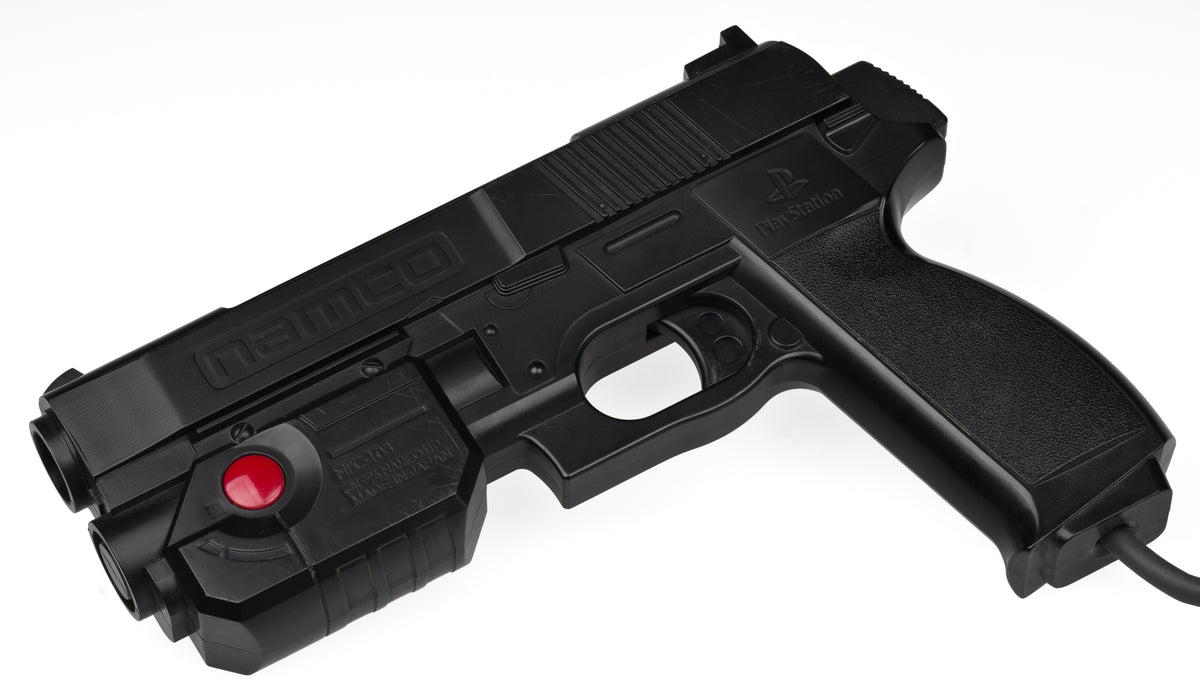
A light gun makes an unusually convincing promise: aim at the thing you want to hit. The awkward part comes years later, when the gun survives but the television, console or missing little box beside the screen does not. You can have a tidy collection of genuine parts and still lack a playable setup.
The interesting history is not simply that old guns became new guns. Designers changed what the controller looks for, how it reports a shot and which software understands the result. Looking at Nintendo's early light-sensing design, the Super Scope, GunCon 3 and Sinden reveals several different answers to the same deceptively simple question: where are you pointing?
Sometimes the picture is part of the input
Nintendo's 1989 light-sensing patent describes a sequence that briefly replaces the game picture with black, then a white area where a target was. A light detector in the gun supplies information that the system uses to decide whether the player hit it. The design also filters the detected signal against television timing.
That is a very different relationship from a button telling the console to jump. Here, the software, displayed image and controller cooperate to make the input. The visible game picture is doing another job behind the scenes. This is one documented Nintendo design, not an explanation of every light gun ever made.
It also changes what “working” should mean to an owner. A game appearing on a television proves that a picture reached the screen; it does not, by itself, prove that a light-sensitive accessory can interpret that picture. Treat those as separate observations when evaluating a setup.

A wireless gun can still depend on the television's scan
Nintendo's Super NES development manual, Book II, describes the Super Scope detecting the CRT's scanning beam. The console uses the resulting timing signal to determine the aimed-at position. Its separate receiver accepts infrared signals from the Scope and passes button and screen-timing information to the console.
The wireless connection and the aiming method are therefore different parts of the design. Removing a cable between your hands and the console did not remove the screen from the calculation. The receiver is also not interchangeable with a device that merely happens to sit near a television.
For a collector, that small receiver deserves as much attention as the enormous gun. Keep the parts identified together, and record which complete combination was demonstrated. A photograph of the gun alone can tell you about its condition and missing exterior pieces, but it cannot show that the whole input system is present.

Changing the tracking system does not unite the game libraries
The North American GunCon 3 manual shows two LED markers positioned at the top of the television. It lists compatible display types including CRT, LCD, plasma and rear-projection sets, within its stated 13-to-50-inch range. Those are instructions for GunCon 3, not a compatibility promise for every similarly named controller.
The same manual limits it to supported PlayStation 3 software and explicitly excludes software for the original GunCon and GunCon 2. This is the important wrinkle: a controller can solve a newer display problem without becoming a universal replacement for its predecessors. The name connects the family; the manual defines the actual supported system.

That distinction is worth preserving in a listing or collection record. “GunCon” is not enough detail if someone needs to know which game they can play. Likewise, a later console's general compatibility features should not be treated as evidence that a specialist controller will work. Our controller history feature explores the broader relationship between input hardware and game design.
A modern border supplies a different reference
Sinden's manufacturer explanation describes software adding a thin border around the displayed image. Its optical system uses that border to calculate where the gun is aimed, then communicates through mouse-cursor input for compatible Windows and Linux applications. This is neither the Nintendo patent's target-flash sequence nor the Super Scope's receiver arrangement.
For someone rebuilding an arcade-style experience, that opens a different planning question: which computer, software and input configuration will be used? A demonstration of a PC game is evidence about that demonstrated setup, not proof that the same device plugs directly into an original console. We have not independently tested Sinden's performance claims.
See the manufacturer's LCD demonstration
Watch Sinden Technology demonstrate the Sinden Lightgun with The House of the Dead 2 on PC.
Official Sinden Technology video, linked from the manufacturer's site. This direct-link fallback opens YouTube, which may show advertising or require sign-in. Playback has not been verified here.
Preserve the explanation alongside the equipment
A useful light-gun collection record should explain what was actually shown to work: the controller model, its companion hardware, the game and platform, and the display arrangement. Save the relevant manual with that record. It gives the next owner something more actionable than a reassuring “tested” sticker.
This is also a reason to keep different problems separate. For a Wii Remote that connects but will not point, use our dedicated Wii Sensor Bar troubleshooting guide. For getting a console's picture onto a screen, start with the video-cable guide. Neither result alone establishes compatibility for another aiming system.
The gun is the part you hold, but the experience lives in the relationship between the parts. Understanding that relationship lets you preserve a specific way of playing, rather than accumulating controllers that look ready for an arcade night but cannot agree with the equipment around them.
Manufacturer documents and image permissions checked October 14, 2026. Featured photograph: the original PlayStation GunCon, not GunCon 3, by Evan-Amos, released into the public domain and used without changes. Hardware photographs are archival illustrations, not gameplay captures. Original manuals are linked for reference; their diagrams are not reproduced.


