

The stamp is the easy part. In Papers, Please, getting a document under it is a small physical task. Deciding which stamp belongs there means reading instructions, comparing information and keeping a crowded desk usable. The paperwork has found a way to become the action.
Lucas Pope's game puts you at the immigration checkpoint in fictional Arstotzka. The developer's official description makes the assignment clear: examine travelers' documents and use the available inspection systems to decide who enters, who is refused and who is arrested.
This guide concentrates on a useful desktop habit: arrange, compare, then inspect. It avoids ending solutions and character-by-character instructions. An orderly desk will not make the decisions for you.
Read the day's instructions before trusting yesterday's routine
Start with the official bulletin. In the promotional capture below, its first-day instructions limit entry to Arstotzkan citizens. Treat that as the rule for the pictured day, not a permanent description of the whole game.

A practical way to approach a new workday is to identify what you need to check before calling the next traveler. Keep the bulletin and rulebook accessible instead of immediately burying them beneath the incoming paperwork. Memory is useful. A reference you can actually read is better than memory insisting it was definitely something like that.
The rulebook's contents page, shown in the featured image, separates basic rules, a regional map, booth information and document guidance. Use those categories to find the relevant reference. Opening the book is not the same as consulting the page that answers your question.
Make a workspace before switching on inspection
In his 2022 account of adapting the game for phones, Pope describes an easily overlooked desktop restriction: documents cannot be moved and pages cannot be turned while inspect mode is active. The expected sequence is to organize the material first, identify a problem, highlight it through inspection and then interrogate.
That makes desk arrangement part of solving the problem. Before entering inspect mode, bring the items you want to compare into view and open the necessary reference page. A passport hidden under another sheet cannot contribute much to your magnificent plan.
Try giving reference material a consistent place and arranging the current traveler's documents where their relevant fields remain visible. This is a suggested workflow, not a mandatory layout or a promise of perfect results. The point is to spend less attention recovering things you just covered up.
Turn a suspicion into a specific comparison
“Something looks wrong” is a starting point. A useful next question is more precise: which two pieces of information are you comparing? The official capture below connects a passport photograph with a wanted-person notice and displays the game's discrepancy prompt.

Read the actual fields rather than using the general appearance of a document as a verdict. When a comparison requires the rulebook, prepare its relevant page before activating inspection. When you need another view, leave inspection and arrange the desk again. Repeatedly clicking around an obstructed workspace does not make the obstruction more cooperative.
For the pictured wanted-person example, the important relationship is between identifiable images. For another check, you may need a different document or rule. Avoid turning one memorable example into a universal shortcut. Learn what the current question requires.
The desk belongs to a larger workday
The end-of-day capture makes the surrounding pressure visible: savings, salary, rent, food and heat share a screen with family status. Its particular numbers belong to that promotional image. They are not a recommended budget or a prediction of what your run will show.
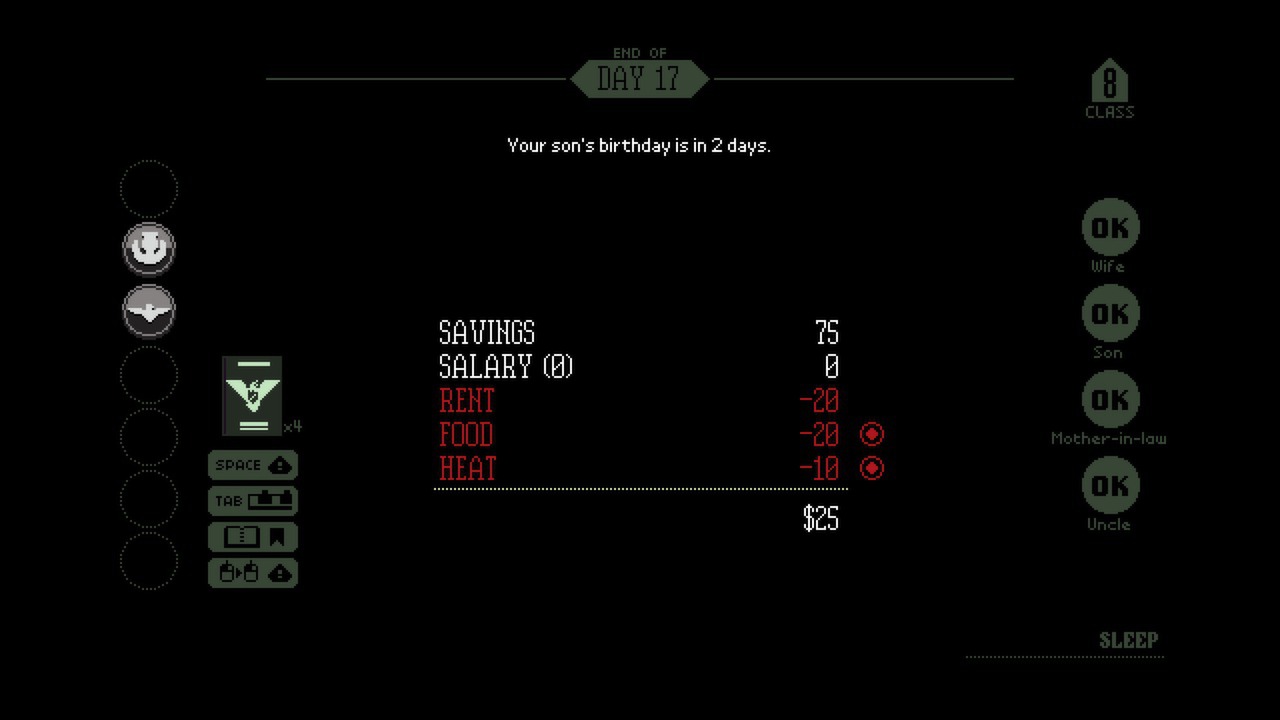
Zypher's reading is that this surrounding context gives the desk its weight. The paperwork does not exist in a cheerful office simulator where a neat filing system is the entire reward. Decisions at work sit beside the needs of people at home.
The newspaper adds another layer. The opening issue places the checkpoint's reopening alongside the prospect of families reuniting. A person arriving at the booth is part of that setting, even while the interface asks you to handle documents. Efficiency and understanding are different things to think about.

Playing on a phone? The desk advice changes
This desktop workflow does not transfer unchanged to every edition. Pope's phone-port explanation describes replacing the freeform document desk with a horizontally scrolling carousel and a smaller navigation rack. That version allows scrolling and page turning during inspect mode.
Choose advice that matches the interface in front of you. Pope's original Vita release article describes another adaptation, combining touch input with physical controls and vertical scrolling. A tip about placing documents with a mouse should not pretend those differences disappear.
Put your next game on the shelf with Zypher
Shop Zypher for your next console game. Browse Zypher's game collection and check each listing's platform, edition, condition and included contents before buying. The Papers, Please link above goes to its official site; this article does not advertise a Zypher copy of that game.
Clearing space before another gaming project? Sell your old games to Zypher. Check the Buy List for eligibility, then give those finished games a job beyond occupying the next shelf.
Sources and official promotional media checked October 26, 2026. Screenshots are publisher-supplied desktop captures from the official Steam gallery, used for commentary about Papers, Please alongside the developer's press materials. © 3909 LLC. This guide is researched analysis, not a claim of a new Zypher playthrough.


