
A used accessory advertised as a “PS2 Multitap” can still be the wrong purchase for your PS2. Sony made different versions for different console designs. Before buying extra controller connections, get the model number from the console and the adapter. The word PlayStation on both pieces is doing very little of the work.
This guide helps you evaluate an original Sony adapter and the console it will connect to. Our controller-port history explores why connection counts and game limits differ across systems. Here, the immediate job is avoiding the wrong PS2 accessory.
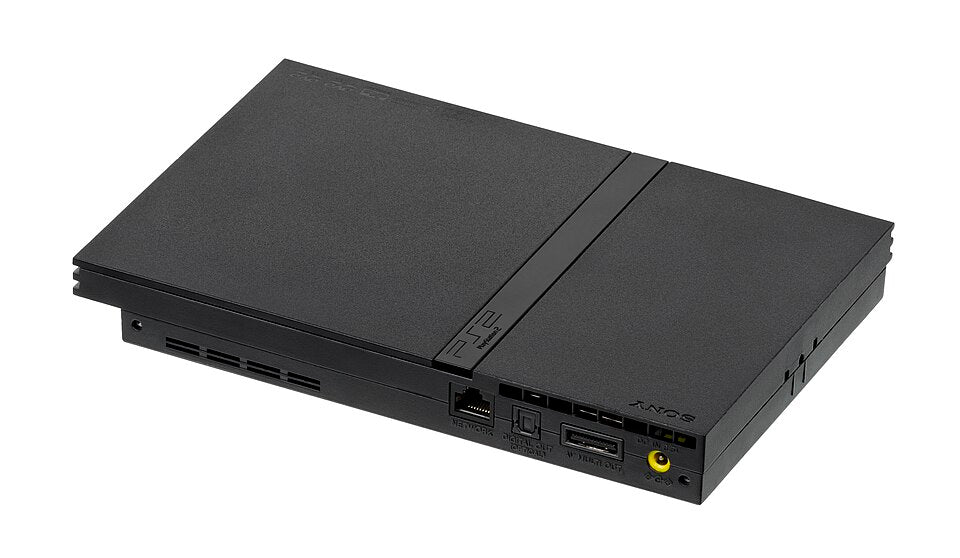
Featured photograph: rear view of a slimline PS2 identified as SCPH-70001 by the photographer. Photo: Evan-Amos, public domain; proportionally reduced, uncropped. This rear view is a console reference, not a picture of a Multitap connection or Zypher's individual stock.
Get two model numbers before comparing prices
Ask for a readable photograph of the console's model label and the Multitap's identification. Keep the full codes, including regional letters. A listing that merely says “fat” or “slim” has not supplied the same information as a model label.
Our buying advice is to keep those photographs with your notes. If a seller offers several adapters under one listing, establish which pictured item corresponds to the selected option. A useful photograph of another unit does not identify the one being sold.
Sony's Japanese PS2 accessory compatibility table separates the following combinations. This table reports that Japanese chart's model families; consult the documentation for your exact regional unit before purchase.
| Sony accessory in the Japanese chart | Compatible PS2 families listed there | Important limit |
|---|---|---|
| SCPH-70120 PS2 Multitap | SCPH-70000 and SCPH-90000 series | Not listed as compatible with the 10000, 30000 or 50000 series |
| SCPH-10090 PS2 Multitap | SCPH-10000, SCPH-30000 and SCPH-50000 series | Not listed as compatible with the 70000 or 90000 series |
| SCPH-1070H PlayStation Multitap | All five listed PS2 families | For PlayStation-format software only |
The last row is especially easy to misread when shopping. Sony's Japanese chart permits that PlayStation accessory for PlayStation-format software. It does not make it a substitute for a PS2 Multitap in PS2 games.

For a North American slim PS2, check the U suffix
Sony's September 2004 redesign announcement identifies the SCPH-70120 U for its North American and US SCPH-70011/70012 consoles. It explicitly says the previous Multitap cannot be used because the design changed, even though the replacement performs the same function.
That is useful evidence for a buyer comparing regional listings. Read the code rather than assuming an accessory's country of sale, case color or seller-written title settles the match. If your exact console is outside the examples here, find its own manual.
Our recommendation is to pause the purchase when either model remains unidentified. A cheap adapter is poor value if the next step is buying another adapter to replace it.
Do not test compatibility by forcing the plug
The English section of Sony's SCPH-90004 quick reference, printed page 16, specifies SCPH-70120 E. It warns that connecting other Multitap model numbers may damage that console. Treat the mechanical mismatch as a reason to stop, not a challenge for your thumbs.
Follow the instructions for the exact console and accessory when connecting them. This guide does not establish the compatibility of third-party products, extension cables or altered connectors. Ask for documentation rather than accepting “it almost fits” as a technical specification.

Ask for a demonstration of the intended game
Once the hardware match is documented, check the particular game's booklet for supported players, modes and connection instructions. For a used setup, request a demonstration of each controller position used by that supported mode, rather than a photograph of disconnected equipment.
Keep the purchase questions concrete: which console model, which adapter model, which controllers and which software edition? Record what is included in the sale separately from what appears in a demonstration. This is a buying check, not a repair procedure.
Choose the game and read the contents
Buy your next PS2 game from Zypher Trading Video Games. For a wrestling collection, check our WWE SmackDown! Here Comes the Pain for PS2 listing. Verify the selected copy's condition, region and included materials. Consult that edition's instructions for its multiplayer setup; this listing link is not a promise of a controller, Multitap or console bundle.
Shop Zypher's PS2 games, or sell your old games to Zypher. Get the model numbers settled before the package arrives.
Sony documents, exact photo permissions and the native Zypher game listing checked November 6, 2026. Shopping workflow suggestions are Zypher editorial advice. Compatibility statements retain their documented regional and model scope.


