
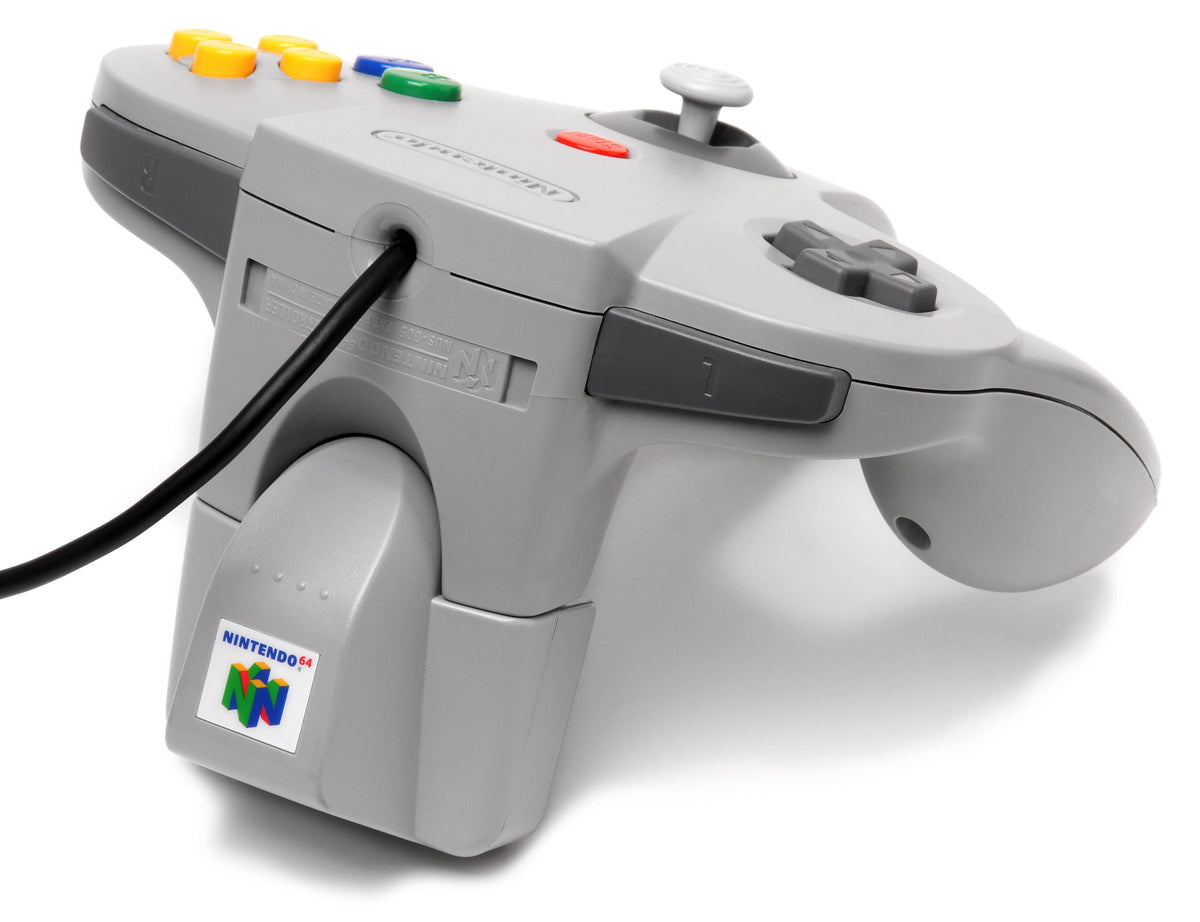
An original Nintendo 64 Rumble Pak adds vibration to a controller that did not have it built in. It does not make every cartridge vibrate, and it does not save your progress. The word “Pak” is doing far too many jobs in this console's accessory drawer.
If yours stays quiet, start with the game, the batteries and the connection. Those checks are more useful than immediately declaring the controller broken. This guide concerns Nintendo's original N64 Rumble Pak, model NUS-013, not a third-party combination accessory or a modern wireless controller.
Match the accessory to the feature
Nintendo's accessory guide explains the arrangement: compatible games send signals to a motor inside the Pak, which attaches to the back of the N64 controller. Look for the Rumble Pak compatibility icon and check the game's instructions.
The original Star Fox 64 for Nintendo 64 is closely associated with the accessory. Nintendo's retrospective interview about the series discusses the N64 game's force feedback and its release alongside the Rumble Pak. That is the original console game, not the separate Nintendo 3DS remake.
A useful test needs a documented compatible game and a moment when it should produce feedback. A silent title screen or an unsupported cartridge is not enough to diagnose a bad Pak. Write down the actual game and what you tried, especially when comparing used hardware.
Two AAA batteries power the original Pak
Nintendo specifies two AAA batteries. The power does not come from a console upgrade under the N64's memory cover. Check the battery markings on the actual accessory and follow the polarity diagram in its compartment.
Nintendo's original Rumble Pak instruction booklet, preserved as a scan, calls for fresh alkaline batteries. It warns that exhausted batteries can make vibration weak and that leaving used batteries installed can damage the unit. Start a test with a fresh matched pair rather than borrowing two unrelated survivors from the remote-control drawer.

Before buying, ask for a photograph with the cover removed as well as one showing it fitted. You want to know whether the compartment is clean, the contacts are intact and the cover stays in place. A front-facing photo can make the outer shell look excellent while leaving those questions unanswered.
Power off before fitting or removing it
The original accessory booklet and Nintendo's Yoshi's Story manual tell owners to switch the console off before inserting or removing the Rumble Pak. Seat it fully in the controller's accessory connector. The original booklet describes a click when it is properly fitted.
When removing it, use the release button rather than pulling against the locking mechanism. With an older unit, also look at the connector before fitting it. Visible debris or damage deserves attention before you push the accessory into another piece of hardware.
For Yoshi's Story specifically, Nintendo lists damage, Flutter Jumps and ground pounds among the events that produce feedback. Use the instructions for the game you actually have. A test from one title does not establish that every other N64 game supports the same feature.
Read a failed test in stages
Nintendo's troubleshooting chart distinguishes several causes. The same symptom can have more than one explanation, so check one thing at a time.
| Symptom | First checks |
|---|---|
| No vibration | Compatible game, fresh batteries, correct polarity and fully seated Pak. |
| Weak vibration | Replace the batteries before assuming the motor has failed. |
| Vibration will not stop | Power off and inspect the controller and Pak connectors for contamination. |
That chart is a starting point, not a repair guarantee. If the basic checks do not resolve the problem, leave the unit's working condition unconfirmed. Buying an untested accessory means accepting an unanswered hardware question, even if the listing's photograph looks reassuring.
A seller's demonstration is more useful when it shows the actual Pak, a compatible game and a clear account of the test. “Tested” without any of that detail gives you very little to compare with your own setup.
Rumble is separate from memory
The original booklet explicitly says the Rumble Pak cannot save or download gameplay data. Nintendo identifies the Controller Pak as a different accessory used for saving in supported games. If missing saves brought you here, buying vibration hardware solves a different problem.
Our N64 Expansion Pak guide explains the separate console-memory upgrade and the distinction from save storage. Identify the intended feature before ordering another gray accessory with a similar name.
Build the game collection at Zypher
Shop Zypher for original Nintendo 64 games. Check the Star Fox 64 listing and browse Zypher's physical game collection. Read the condition and included items on each listing. A game listing is not evidence that a controller or Rumble Pak is included.
Making room for the next setup? Sell your old games to Zypher.
Original Nintendo instructions, current source access and image provenance checked October 26, 2026. Historical parts-ordering and service offers in old manuals are not presented as current offers. Featured controller photograph and inline accessory photograph: Evan-Amos, public domain, unmodified. Images illustrate the hardware, not a specific item for sale or a new Zypher hardware test.


