
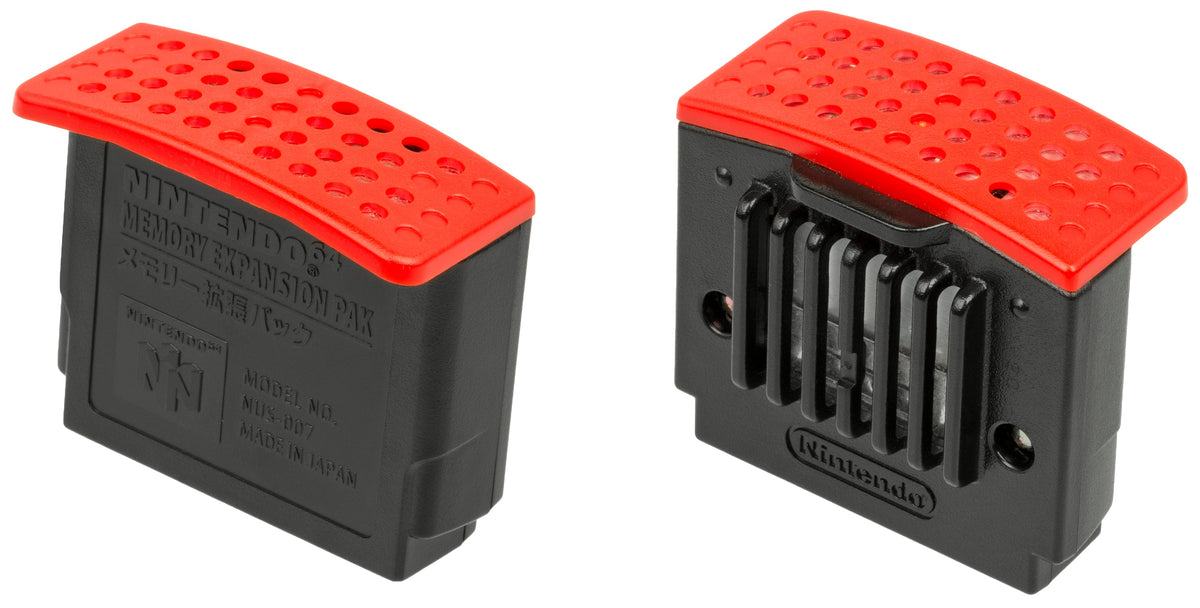
The Nintendo 64 Expansion Pak makes a good case for collecting a setup around the games you want to play. Its red top is easy to recognize, but the important question is what a particular cartridge expects to find underneath the console's memory cover. An accessory can be optional for one game and essential for another.
That creates a more interesting ownership problem than simply hunting down every Nintendo-branded extra. A shelf can look complete while a planned evening's game is still missing a requirement. Start with the intended experience, then work backward to the hardware that makes it possible.
One Console Library, Three Different Expectations
Nintendo's accessory guide identifies Donkey Kong 64 and The Legend of Zelda: Majora's Mask as requiring the Expansion Pak. It describes Perfect Dark as running in a restricted mode without one. Those examples separate a requirement from a partial experience; neither should be confused with an optional improvement.
For a buyer, those distinctions change the order of decisions. If a required game is the reason for buying an N64, the accessory belongs in the initial setup plan. For a game with restrictions, decide which parts of the experience matter before accepting a seller's statement that the cartridge runs. A boot screen answers a narrower question than a completed compatibility check.
Optional support deserves equally precise language. Nintendo says unsupported games receive no benefit. There is no reason to interpret the red top as a universal upgrade badge, and this article makes no blanket claim about sharper graphics or faster performance. Treat each game's documented support as its own case.

The Red Top Adds Working Memory
Nintendo's 1998 Expansion Pak instruction booklet, preserved by Internet Archive, specifies an additional 4 MB, bringing main memory to 8 MB. Its installation sequence replaces the Jumper Pak in the console's top memory slot. This is the hardware distinction to establish before discussing condition, packaging, or a bundle's value.
Ask for a clear photograph of the installed accessory's visible identification, taken safely with the system off. A listing that merely says “memory included” leaves too much room for misunderstanding. Keep the seller's wording alongside the photographs so that the claimed contents remain clear after the sale.
Saved progress is a different job. Nintendo identifies the Controller Pak as storage used by certain games, while many others save on the cartridge itself. It is not the Expansion Pak. The shared word is an unfortunate little vocabulary test for anyone returning to the system after years away.

A Game Boy Connection Is a Third Question
The Transfer Pak has another purpose: moving supported data between compatible Game Boy and N64 games. Nintendo lists Pokémon Stadium among the supported N64 titles. Compatibility should be checked for the exact pair of games, rather than inferred from the fact that both cartridges carry the same franchise name.
This is where a collection inventory becomes more useful than a pile of accessories. Record the game, intended feature, required device, and whether you have seen that feature demonstrated. One row might concern access to a game; another concerns keeping progress; a third concerns a connection between games. Keeping those jobs separate prevents a purchase in one category from being mistaken for a solution in another.

Preserve the Setup, Including the Unglamorous Parts
The original Expansion Pak booklet calls for switching the console off and unplugging it before installation. It warns owners to wait an hour after power-off before touching or removing a hot Expansion Pak, use the proper ejector tool, keep its vents unobstructed, and replace the memory cover. An old instruction booklet is useful here; its historical warranty and parts-ordering information should not be mistaken for a current service offer.
For a used bundle, record the cover, appropriate tool, and exact installed accessory as separate contents. Resist turning a seller's uncertain description into your own certainty. If the identification or working condition cannot be established, leave that question open in the purchase decision rather than filling it with an optimistic guess.
Two short notes can make the inventory useful: “documented requirement” and “observed on this setup.” The first belongs to the game's manual; the second belongs to the actual hardware being purchased. Keep the date and the demonstrated function with the second note. That distinction gives you a way to track uncertainty without pretending a photograph or a brief test is a lifetime guarantee.
It also keeps cosmetic completeness separate from usefulness. A boxed accessory can be appealing as an object, while a loose one may meet a particular play goal. Decide which of those goals you are paying for before comparing listings. The answer can change from one purchase to the next without making either approach wrong.
The broader lesson is that software belongs in the description of a hardware collection. “N64 with accessories” tells a future owner less than a short list of games and the functions the setup has demonstrated. That record also makes lending the console easier: the borrower knows what each device does and which pieces need to return together.
For the historical distinction between working memory and preserving progress, read our history of game saves. Our cartridge-format field guide covers the physical media around the setup. Build around a game you intend to use, and the accessory list becomes a set of reasons rather than a shopping challenge.
Sources and image permissions checked October 15, 2026. Featured Expansion Pak photograph by Evan-Amos, public domain; unaltered. The images illustrate historical hardware, not items offered for sale. No hands-on testing is claimed.


