
Zypher XP | Nintendo Switch OLED care
The Nintendo Switch OLED has a layer on its screen that is supposed to stay there. Finding an edge does not make it packaging. Before you give the display the satisfying peel treatment, Nintendo has a much less exciting instruction: leave the factory anti-scattering film attached.
This guide covers that film, optional screen protectors and a conservative screen-care routine for the OLED model. It is about looking after the handheld you own, not promising to erase scratches or repair a damaged display.
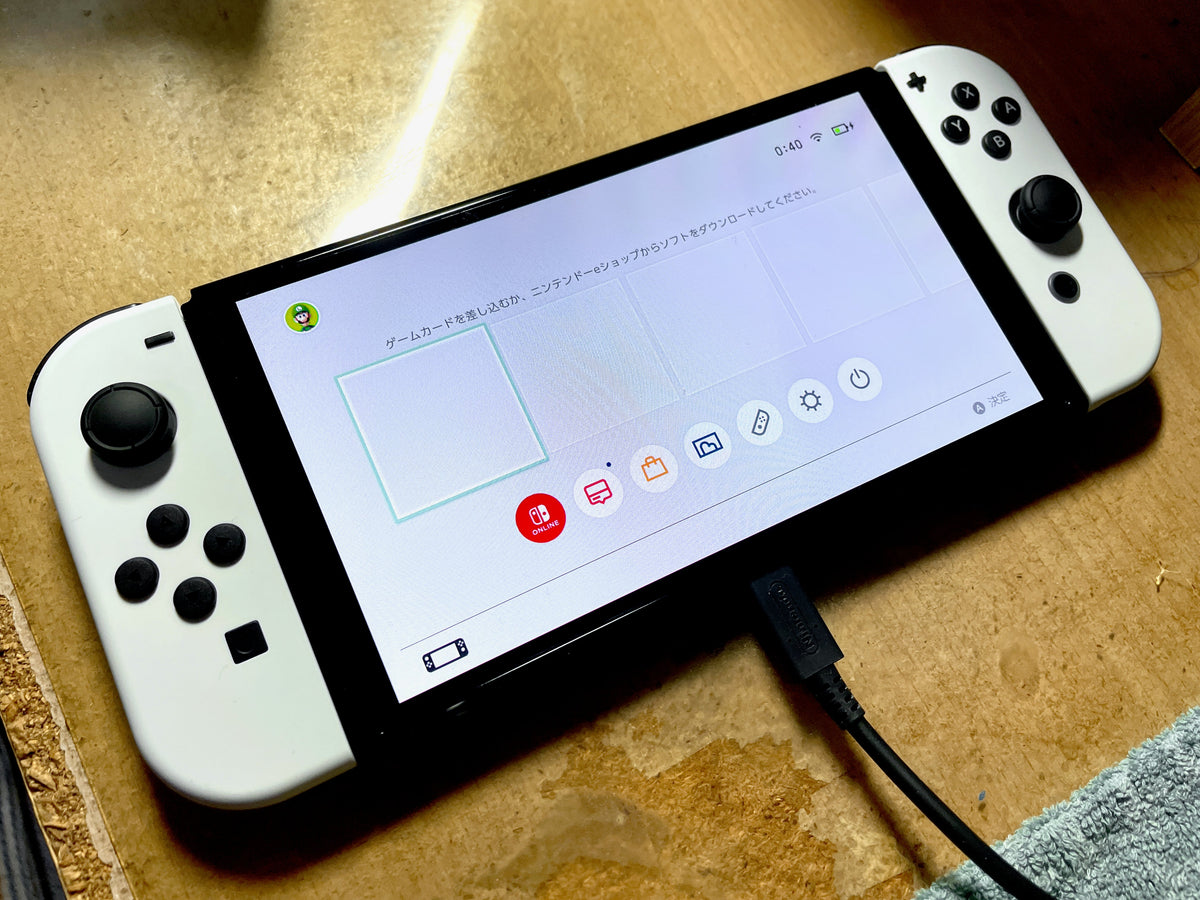
Featured photograph: Nintendo Switch OLED with white Joy-Con and a Japanese HOME Menu. The cable is connected in this reference photo; Nintendo says to power off and unplug accessories before cleaning. Photo: Kyu3a, via Wikimedia Commons, CC BY-SA 4.0. No editorial crop or retouch; hosting may recompress the photograph.
The factory film and your optional protector are different layers
Nintendo's OLED overview and FAQ identifies this console as model HEG-001. It says the screen has an anti-scattering adhesive film and tells owners not to peel it off. An optional screen-protector film goes on top of that existing layer.
That distinction matters when buying a used system. Our advice is to ask whether an additional protector was fitted and keep its packaging or model information if available. “There is something on the screen” does not tell you which layer you are looking at. Do not start lifting corners to settle the question.
The same FAQ says an officially licensed protector can be installed and reapplied, following the protector's own removal instructions. That is a specific statement about those accessories. It does not turn an unidentified secondhand layer into a good candidate for an improvised removal tutorial.
Choose a protector expressly intended for Switch OLED. Nintendo warns that versions intended for the original Switch or Switch Lite may not fit correctly. A box that says Nintendo Switch somewhere on the front still deserves a closer read.
Give a fingerprint a small job, not a full restoration project
Start with Nintendo's cleaning guidance: turn the console off and unplug accessories before cleaning. Save your progress before shutting down. The connected, powered-on handheld in the featured photograph illustrates the hardware, not the setup for this job.
For a dirty screen, Nintendo's system precautions call for a soft, clean cloth, such as a lens or eyeglass cloth. For this screen-focused routine, use gentle dry wiping. Do not treat the presence of factory film as permission to scrape at the surface or press hard.
Do not use a screen edge as a starting point for a fingernail or tool. The film instruction applies during care as well as unboxing. Nintendo warns that sharp objects and pressure can damage the screen; trying to get underneath a layer is outside this routine.
The broader cleaning page also permits a soft cloth dampened with water and wrung out before gently wiping the product. It forbids pouring liquid directly onto it or submerging it, and says the product must be completely dry before use. Those instructions are not a reason to wet a display when the simple cloth method has already worked.

Surface care and OLED habits solve different problems
Nintendo's precautions also advise leaving the default sleep-mode settings enabled and avoiding the same image on the OLED screen for extended periods to reduce the risk of image retention or burn-in. That concerns how the display is used. Wiping away a smudge is a separate job.
Our practical suggestion is to keep those decisions separate when checking a used console. Describe what you can observe without diagnosing the cause from a photograph. If a display issue remains, use Nintendo's support guidance rather than presenting another cleaning pass as a repair.
The factory-film warning still applies if the screen looks imperfect. This guide offers no procedure for replacing that layer, polishing the screen or repairing the panel. Keeping an unresolved flaw visible is preferable to adding a new one while chasing a cosmetic result.

Buy the game you meant to buy at Zypher
Put the next game in your collection with Zypher Trading Video Games. Browse our verified listings for LEGO City Undercover for Nintendo Switch or Pokémon: Let's Go, Eevee! for Nintendo Switch. Check each selected copy's condition and included contents. These are game listings, not offers for an OLED console or screen protector.
Shop Zypher's games, or sell your old games to Zypher when it is time to make room for something else.
Nintendo instructions, image licenses and native store listings checked November 2, 2026. Buying and inspection suggestions are Zypher editorial advice. Photographs are reference images by Kyu3a, not Zypher testing or before-and-after results. No endorsement is implied.


